
What Is the "Behind the Scenes" AI Video Trend?
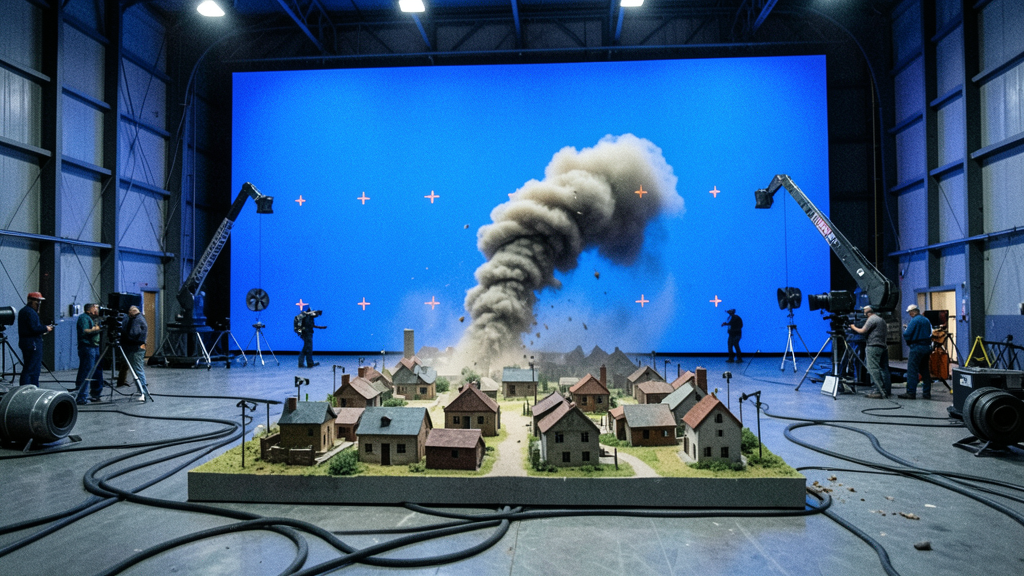
A giant wave crashes into a handcrafted miniature city. A crew in "SPECIAL EFFECTS" jackets works the rig beside it, dwarfed by the towering blue chroma wall. It looks like a leaked clip from a real blockbuster set — and it's entirely AI-generated.
Aug 16, 2026 · 6 min read · Content Format
Why This Format Is Spreading
The trend works because it borrows the visual language of something everyone already recognizes — a real film production's practical-effects reveal — and applies it to a place that could never actually be filmed that way. The contrast between a tiny, obsessively detailed miniature and a full-size human crew standing right next to it is what sells the scale, and scale is what makes people stop scrolling.
It also reads as more "real" than most AI content, precisely because it leans into visible imperfection: handheld camera shake, exposed cables, a slightly blown-out blue screen. Polish would actually undercut the illusion.
What You Actually Get
Each generation produces a photorealistic movie-set still first, then animates it into an 8-second video — always with sound, since crew chatter and practical set noise are core to the concept. Pick a place, pick one of 20 disaster modules, pick a camera vantage, and Zyvo assembles the rest.
How to Generate One in Zyvo
Pick a place
Describe the miniature city or town — anything from a neon harbor to a mountain village.
Pick a disaster
Choose from 20 practical-effects modules, from giant waves to giant robots.
Zyvo builds the shot
A movie-set image generates first, then animates into an 8-second video with full sound.
Not Real Footage
Every image and video is AI-generated. It's not real footage from an actual production, and it isn't affiliated with any studio. The format is a parody of the practical-effects reveal shot — see exactly why it looks so convincing for the details.
Try It Yourself
Pick a place, pick a disaster, and let Zyvo build and animate the shot. Or browse 18 ready-to-use episode ideas first.
Explore Behind the ScenesRelated Articles
Behind the Scenes vs Micro Camera Animal: Documentary-Style AI Video Compared
Both formats build a video around scale and perspective, but the feeling they create is nothing alike.
21.08.2026
How Long Does a Behind the Scenes Video Take to Make?
From picking a disaster module to a finished 8-second clip with sound.
21.08.2026
Why AI 'Movie Set' Miniature Disaster Videos Look So Real
The scale-contrast trick, the locked style bible, and why practical framing sells the illusion.
16.08.2026
18 Behind the Scenes AI Video Ideas You Can Generate Right Now
Curated place-and-disaster combos across every module, ready to copy into the generator.
16.08.2026
8 Behind the Scenes Disaster Types Explained
What each disaster module feels like, and which places suit it best.
16.08.2026
Behind the Scenes vs Clay Rescue: Which Miniature AI Video Format Should You Try?
Same scale-contrast trick, opposite emotional arc — how to pick.
16.08.2026


